Product Insight & PRD · pm-insight-prd
GitHub 仓库与下载地址:github.com/SummerDogg/pm-insight-prd
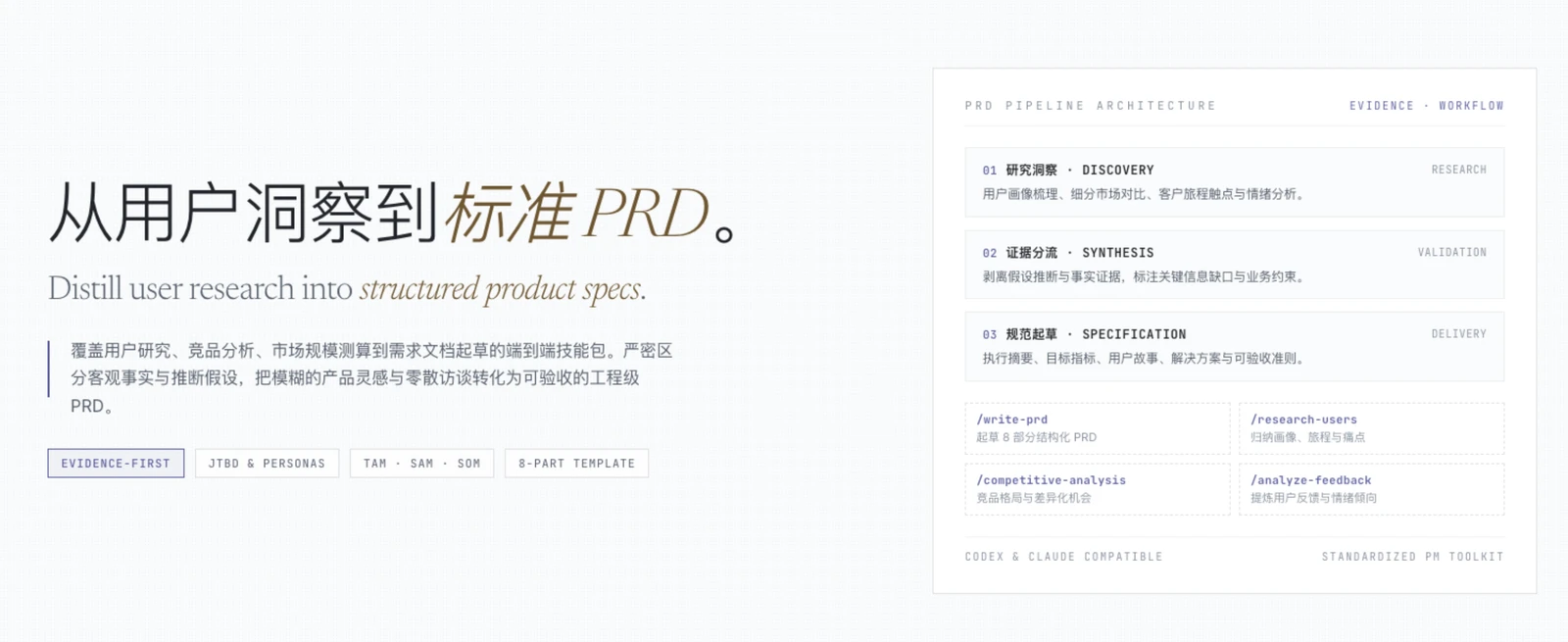
一套从用户与市场研究到产品需求文档的 AI 技能包。它包含 9 个技能和 4 个引导式工作流,适合产品经理、产品负责人和创业团队。
This is an AI skill package for moving from user and market research to a structured Product Requirements Document (PRD). It includes 9 skills and 4 guided workflows for product managers, product leads, and founders.
It contains 9 PM skills and 4 chained workflows across 1 plugin.
中文
能做什么
产品洞察与 PRD 帮你把用户、市场和竞品信息整理成清晰的产品决策与需求文档:
- 从产品创意、问题描述、会议记录或现有研究材料起草 PRD。
- 根据访谈、反馈和用户数据整理用户画像与用户细分。
- 梳理客户旅程、关键触点、体验痛点和改进机会。
- 估算 TAM、SAM、SOM,比较目标细分市场。
- 分析竞品、差异化机会、用户评价与反馈主题。
- 把研究结论、已知事实、假设和待确认问题区分开,再纳入 PRD。
它聚焦在产品研究与需求定义,不负责营销活动策划、增长策略或完整的上市推广计划。
包含的 9 个技能
| 技能 | 用途 |
|---|---|
pm-insight-prd |
组织从产品问题、按需研究到 PRD 撰写的端到端流程。 |
create-prd |
按统一的 8 个部分撰写或审阅 PRD。 |
user-personas |
从研究资料中归纳用户画像、JTBD、痛点与收益。 |
market-segments |
找出并比较有潜力的客户细分市场。 |
user-segmentation |
根据用户行为、任务和反馈划分用户群体。 |
customer-journey-map |
描绘客户旅程、触点、情绪、痛点和机会。 |
market-sizing |
用自上而下和自下而上的方法估算 TAM、SAM、SOM。 |
competitor-analysis |
比较竞品优劣势并寻找差异化机会。 |
sentiment-analysis |
从评价、问卷或反馈中归纳情绪与主题。 |
4 个引导式工作流
| 命令 | 用途 |
|---|---|
/pm-insight-prd:write-prd |
收集背景信息并生成结构化 PRD。 |
/pm-insight-prd:research-users |
整理用户画像、用户细分和客户旅程。 |
/pm-insight-prd:competitive-analysis |
梳理竞争格局、竞品优劣势和差异化机会。 |
/pm-insight-prd:analyze-feedback |
汇总反馈主题、情绪和用户群体线索。 |
Codex 会读取技能,但不会把这些 Claude 风格的命令注册为斜杠命令。使用 Codex 时,请直接描述要完成的任务;命令名称可以作为工作流提示写进请求。
工作流程
- 说明目标与背景:提供产品想法、要解决的问题、目标用户、已有方案和约束。可以粘贴文本,也可以附上访谈、问卷、客服反馈或产品资料。
- 识别信息缺口:技能先利用你提供的内容;缺少会影响结论的关键信息时,会提出针对性问题,并把未知项标出来。
- 按需做研究:选择与问题相符的用户画像、用户细分、客户旅程、市场规模、竞品或反馈分析,不需要每次都运行全部研究。
- 综合证据与假设:把资料中的事实、来源、推断和待验证假设分开,避免将猜测写成已验证结论。
- 生成并迭代 PRD:根据研究与需求生成文档,确认优先级、非目标、成功指标、开放问题和交付阶段,再按反馈修改。
PRD 的结构
write-prd 工作流会生成以下 8 个部分:
- 执行摘要:功能或产品是什么、服务谁、为什么现在做。
- 问题与背景:用户问题、现状、已有研究和触发背景。
- 目标与成功指标:目标、非目标、当前值、目标值和衡量方式。
- 目标用户与细分市场:目标用户、关键场景、需求与约束。
- 价值主张与需求:用户故事、优先级和验收标准。
- 解决方案概述:核心方案、关键决策、必要时的设计或技术说明。
- 开放问题与假设:尚未确认的问题、负责人和待验证假设。
- 发布计划与阶段:首版范围、后续阶段、依赖关系和相对时间安排。
安装到 Codex
先从 GitHub 克隆项目:
git clone https://github.com/SummerDogg/pm-insight-prd.git
cd pm-insight-prd
codex plugin marketplace add .
codex plugin add pm-insight-prd@pm-insight-prd
如果只想安装独立技能、不使用插件市场,可以把技能目录复制到 Codex 的用户级技能目录:
mkdir -p ~/.codex/skills
cp -R ./pm-insight-prd/skills/* ~/.codex/skills/
使用插件安装或手动复制其中一种方式即可,避免重复安装同名技能。安装后新开一轮 Codex 对话或重启 Codex,让新技能进入可用列表。
怎么使用
直接说明任务、背景和资料即可。示例:
用 create-prd 帮我为“团队共享的项目模板”写一份 PRD。
目标用户是 10–50 人的软件团队;重点解决模板分散、重复配置的问题。
先告诉我还缺哪些关键信息,再生成 PRD。没有数据支撑的内容请标成假设。
根据附件里的 12 份用户访谈,归纳用户画像和主要细分群体,
再总结客户旅程中的高频痛点。请区分原始证据和你的推断。
比较这三个竞品在目标客户、主要能力、定价方式和差异化上的特点,
然后把有证据支持的结论整理到现有 PRD 的背景和价值主张部分。
分析这份客服反馈 CSV 中的主要主题与情绪,指出哪些用户群体的问题最集中,
并列出建议进一步验证的问题。
想直接开始工作流,也可以这样说:
- “按
write-prd流程,为这个问题起草 PRD……” - “按
research-users流程,整理这批用户研究资料……” - “按
competitive-analysis流程,分析这个产品的竞品……” - “按
analyze-feedback流程,归纳附件中的用户反馈……”
使用建议
- 有现成材料时先提供材料,让结论基于你的产品和用户,而不是泛化模板。
- 需要当前市场信息时,明确市场、地区、时间范围和需要比较的维度。
- 把业务决策与分析结论分开;没有来源的数据应标注为估算或假设。
- PRD 不是越长越好。优先写清问题、目标用户、成功标准、范围、验收标准和风险。
- 使用敏感的用户资料前,先移除不必要的个人身份信息。
目录结构
pm-insight-prd/
├── .claude-plugin/marketplace.json
└── pm-insight-prd/
    ├── .claude-plugin/plugin.json
    ├── skills/       # 9 个独立技能
    └── commands/     # 4 个引导式工作流
English
What it does
Product Insight & PRD turns user, market, and competitor information into clearer product decisions and requirements:
- Drafts a PRD from a product idea, problem statement, meeting notes, or existing research.
- Builds user personas and behavioral segments from interviews, feedback, and user data.
- Maps customer journeys, touchpoints, friction, and improvement opportunities.
- Estimates TAM, SAM, and SOM and compares target segments.
- Analyzes competitors, differentiation opportunities, reviews, and feedback themes.
- Separates evidence, assumptions, inferences, and open questions before they enter a PRD.
The scope is product research and requirements definition. It does not provide campaign planning, growth strategy, or a full go-to-market plan.
The 9 skills
| Skill | Purpose |
|---|---|
pm-insight-prd |
Coordinates the end-to-end flow from product question through relevant research to PRD drafting. |
create-prd |
Drafts or reviews a PRD using a consistent eight-part structure. |
user-personas |
Synthesizes personas, jobs-to-be-done, pains, and gains from research. |
market-segments |
Identifies and compares promising customer segments. |
user-segmentation |
Groups users by behavior, jobs, needs, and feedback. |
customer-journey-map |
Maps stages, touchpoints, emotions, pain points, and opportunities. |
market-sizing |
Estimates TAM, SAM, and SOM using top-down and bottom-up approaches. |
competitor-analysis |
Compares competitors and identifies differentiation opportunities. |
sentiment-analysis |
Extracts sentiment and themes from reviews, surveys, and feedback. |
The 4 guided workflows
| Command | Purpose |
|---|---|
/pm-insight-prd:write-prd |
Gathers context and produces a structured PRD. |
/pm-insight-prd:research-users |
Organizes personas, user segments, and customer journeys. |
/pm-insight-prd:competitive-analysis |
Maps competitors, strengths, weaknesses, and differentiation opportunities. |
/pm-insight-prd:analyze-feedback |
Summarizes feedback themes, sentiment, and segment signals. |
This single plugin groups PRD writing with user and market research. Its skill and command lists above are the complete package inventory.
Codex loads the skills but does not expose these Claude-style command files as slash commands. In Codex, describe the task directly and use a command name as a workflow hint if helpful.
Workflow
- Describe the goal and context. Provide the product idea, problem, target users, current alternatives, and constraints. You can attach interviews, surveys, support feedback, or product documents.
- Identify information gaps. The skill starts with your materials, asks focused questions when a missing fact changes the outcome, and labels unknowns.
- Research only what is needed. Choose relevant persona, segmentation, journey, market-sizing, competitor, or feedback analysis instead of running every research method for every task.
- Synthesize evidence and assumptions. Keep source-backed facts, inferences, and hypotheses distinct so guesses are not presented as validated findings.
- Draft and iterate on the PRD. Confirm priorities, non-goals, success measures, open questions, and release phases, then revise the document from your feedback.
PRD structure
The write-prd workflow produces these eight sections:
- Executive Summary: what the product or feature is, whom it serves, and why now.
- Problem & Background: user problem, current state, prior research, and context.
- Objectives & Success Metrics: goals, non-goals, baselines, targets, and measurement.
- Target Users & Segments: target users, key situations, needs, and constraints.
- Value Proposition & Requirements: user stories, priorities, and acceptance criteria.
- Solution Overview: core approach, key decisions, and relevant design or technical notes.
- Open Questions & Assumptions: unresolved questions, owners, and hypotheses to validate.
- Release Plan & Phasing: first-release scope, later phases, dependencies, and relative timing.
Install in Codex
Clone the repository from GitHub:
git clone https://github.com/SummerDogg/pm-insight-prd.git
cd pm-insight-prd
codex plugin marketplace add .
codex plugin add pm-insight-prd@pm-insight-prd
To install only the standalone skills without adding the plugin marketplace, copy the skills directory into your user-level Codex skills folder:
mkdir -p ~/.codex/skills
cp -R ./pm-insight-prd/skills/* ~/.codex/skills/
Choose either plugin installation or manual copying to avoid duplicate skill names. Start a new Codex turn or restart Codex after installation so the skills are discovered.
How to use it
Describe the task, context, and available materials. For example:
Use create-prd to write a PRD for shared project templates for software teams of 10–50 people.
The problem is that templates are scattered and repeatedly configured. Ask for critical missing
information first, then draft the PRD. Label anything unsupported by data as an assumption.
Use the 12 attached user interviews to identify personas and major segments, then map the most
frequent journey pain points. Separate direct evidence from your interpretation.
Compare these three competitors by target customers, core capabilities, pricing approach, and
differentiation. Add evidence-backed findings to the background and value-proposition sections
of the existing PRD.
Analyze the attached support-feedback CSV for themes and sentiment. Identify the user groups with
the most concentrated problems and list questions that need further validation.
You can also request a workflow by name:
- “Use the
write-prdworkflow to draft a PRD for…” - “Use the
research-usersworkflow to organize these research notes…” - “Use the
competitive-analysisworkflow to assess competitors for…” - “Use the
analyze-feedbackworkflow to summarize this user feedback…”
Good practices
- Provide source material so findings reflect your product and users rather than a generic template.
- For current market information, specify geography, time range, and comparison criteria.
- Keep business decisions distinct from analysis; label unsourced figures as estimates or assumptions.
- A PRD should be concise. Make the problem, target users, success criteria, scope, acceptance criteria, and risks easy to find.
- Remove unnecessary personal identifiers before sharing sensitive user data.
Directory layout
pm-insight-prd/
├── .claude-plugin/marketplace.json
└── pm-insight-prd/
    ├── .claude-plugin/plugin.json
    ├── skills/       # 9 standalone skills
    └── commands/     # 4 guided workflows
License
MIT. See LICENSE for the required copyright and license notice.
- 作者:赵聪(ZhaoCong),产品经理与独立开发者。